On this page
The UPSC Civil Services (IAS) application is arguably the most critical form of your career. Yet, every year, thousands of aspirants panic because of one small detail: The Photo.
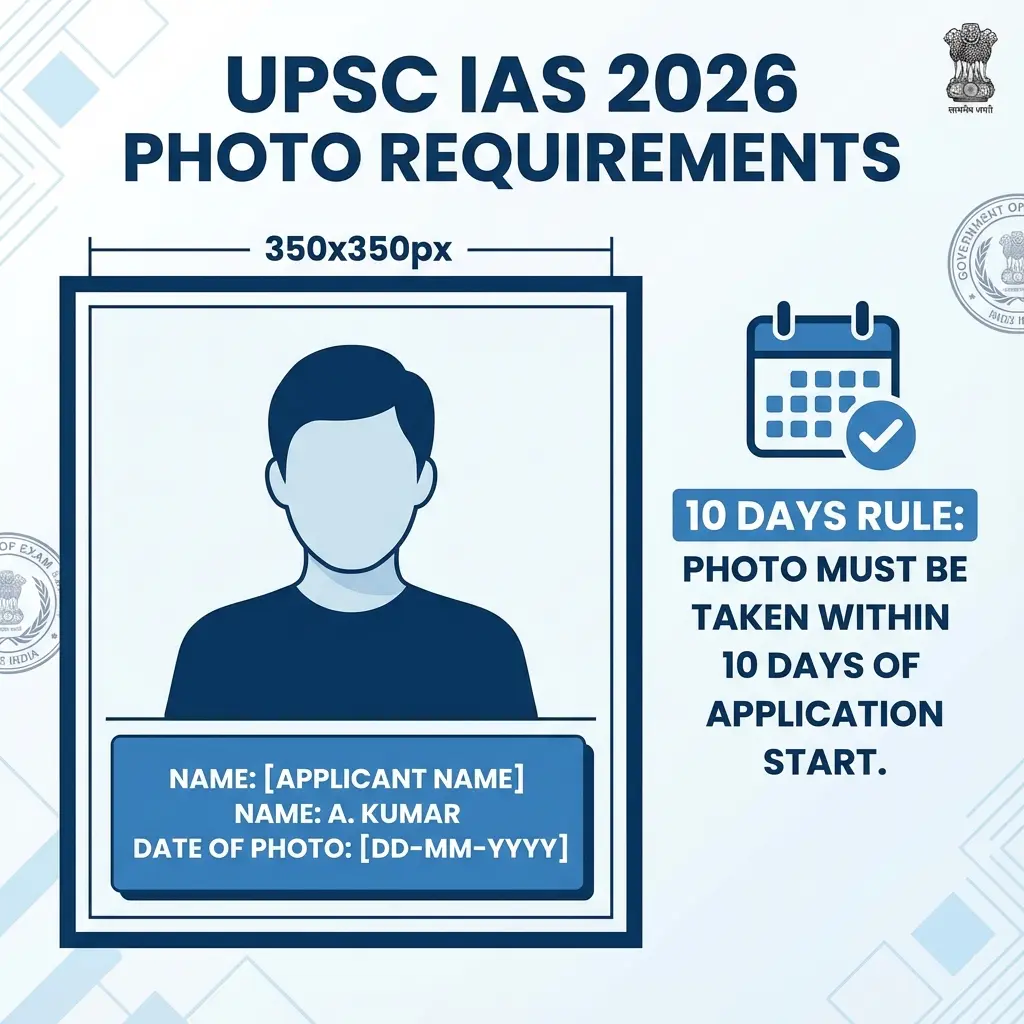
UPSC doesn't just want a photo. It wants a specific format:
- 350 x 350 Pixels (Exact square).
- Name & Date printed at the bottom.
- White Background.
If you upload a normal selfie or a photo without the date, your candidature can be cancelled at the interview stage. Don't risk it.
⚠️ The 10-Day Rule
UPSC notification says the photo must not be older than 10 days from the notification date. The date printed on your photo proves this. Do not use an old photo.
The Name & Date Rule Explained
UPSC demands a "Slate" or text at the bottom.
- Name: Must match your Matriculation Certificate.
- Date: Must be DD-MM-YYYY format.
- Text Visibility: Must be legible.
Our tool ensures the text is high-contrast black on white.
Cheat Sheet: UPSC 2026 Requirements
| Feature | Requirement | Why? |
|---|---|---|
| Dimensions | 350 x 350 px | Standard for admit card clarity. |
| Slate (Patti) | Name + Date of Photo | Mandatory proof of recent photo. |
| Face Coverage | 75% of image | Face must be zoomed in. |
| Glasses | Allowed (if transparent) | Dark glasses = Instant Rejection. |
| File Format | JPG Only | PDF/PNG not accepted. |
 UPSC Photo Sample: Name & Date Format
How to Create UPSC Photo (Free Tool)
You don't need Photoshop to add the Name/Date strip. Our tool does it for you.
- Click a Photo: Stand against a white wall. Ask someone to click it using the rear camera.
- Open Tool: Go to the UPSC Resizer Tool.
- Enter Details: Type your Name and select Today's Date.
- Upload: Select your photo.
- Generate: The tool adds the white strip, writes the text, and resizes it to 350x350px.
- Download: Ready for upload.
Common Rejection Reasons
- Blurry Name: If the text on the slate is not readable, it's invalid.
- Side Pose: Looking left/right. Look straight at the camera.
- Flash Glare: Flash reflection on spectacles. Remove glasses if possible.
Useful Tools
FAQ: UPSC Photo Rules
Frequently Asked Questions
Yes, if you normally keep a beard, it is allowed. However, your appearance in the photo should match your appearance during the Preliminary exam and Interview.
Yes. The notification explicitly mentions that the photograph must have the name and date of taking the photograph.
No. UPSC usually requires a clear Color Photograph.
Copy citation for academic or reference use:
DocSet Team
✓ VerifiedExperts in Document Processing & Government Exam Specifications. We research official notifications from SSC, UPSC, IBPS, and other bodies to provide accurate, up-to-date image resizing and document preparation guidelines.