On this page

You spent 3 weeks creating meticulous Handwritten Notes or a Legal Contract. You share it on a Telegram group or WhatsApp. Within 10 minutes, someone forwards it to another group. One day later, someone else is selling it under their name.
This is Content Theft. The only way to stop it (or at least prove ownership) is a WATERMARK.
A big, diagonal stamp that says "CREATED BY [YOUR NAME]" or "CONFIDENTIAL".
🔒 Privacy First
Unlike other free tools that upload your precious content to a server (risky!), DocSet Watermarker works 100% Offline in your browser. Your file never leaves your computer.
Cheat Sheet: Best Watermark Practices
| Use Case | Recommended Text | Color / Opacity |
|---|---|---|
| Coaching Notes | (C) YOUR ACADEMY NAME | Grey / 30% (Readable) |
| Legal Draft | DRAFT - NOT FINAL | Red / 20% (Warning) |
| Business Plan | CONFIDENTIAL | Red / 15% (Subtle) |
| Sample Work | SAMPLE - DO NOT COPY | Dark / 50% (Strong) |
How to Add Watermark (Step-by-Step)
- Open Tool: Go to Watermark PDF Tool.
- Upload: Select your PDF.
- Type Text: Enter what you want (e.g., "Rahul Sir Notes").
- Style It:
- Position: Center or Diagonal (Diagonal is harder to crop out).
- Size: Make it big enough to cover the page but small enough to not block text.
- Opacity: Keep it around 50%. If it's too dark (100%), the text behind it becomes unreadable.
- Color: Red is best for "CONFIDENTIAL". Light Grey is best for Branding.
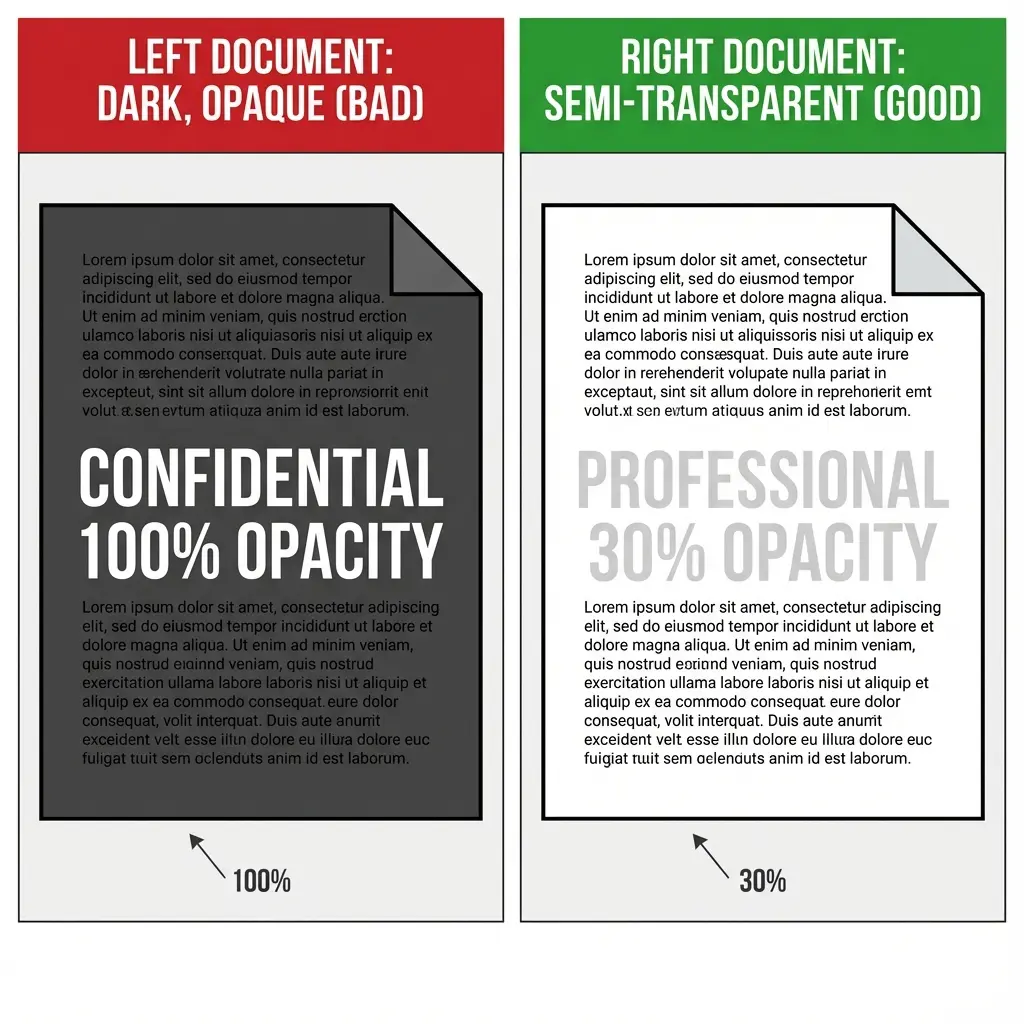 Watermark Transparency Guide: Best settings for readability
- Apply & Download.
FAQ: Watermarking PDFs
Secure Your PDF Nowols
Frequently Asked Questions
If you have the original file, yes. But once you save the PDF with a watermark, it becomes a permanent part of the image/page. This is a security feature.
Currently, this tool supports text watermarks. We are working on adding an image logo feature soon.
No, standard watermarks are transparent. You can adjust the "Opacity" slider to ensure the content behind makes is still readable. ---
Copy citation for academic or reference use:
DocSet Team
✓ VerifiedExperts in Document Processing & Government Exam Specifications. We research official notifications from SSC, UPSC, IBPS, and other bodies to provide accurate, up-to-date image resizing and document preparation guidelines.